 jeonghyo.k
3946ff6a25
jeonghyo.k
3946ff6a25
- prediction/image/ FastAPI 서버 Docker 환경 구성
  - Dockerfile: PyTorch 2.1 + CUDA 12.1 기반 GPU 이미지
  - docker-compose.yml: GPU 할당 + 데이터 볼륨 마운트
  - requirements.txt: 서버 의존성 목록
  - .env.example: 환경변수 템플릿
  - DOCKER_USAGE.md: 빌드/실행/API 사용법 문서
  - Dockerfile에 .dockerignore 제외 폴더 mkdir -p 추가
- .gitignore: prediction/image 결과물 및 모델 가중치(.pth) 제외 추가
- dbInsert_csv.py, dbInsert_shp.py 삭제 (미사용 DB 로직)
- api.py: dbInsert import 및 주석 처리된 DB 호출 코드 제거
- aerialRouter.ts: req.params 타입 오류 수정
6.8 KiB
BEiT
BEiT: BERT Pre-Training of Image Transformers
Introduction
Abstract
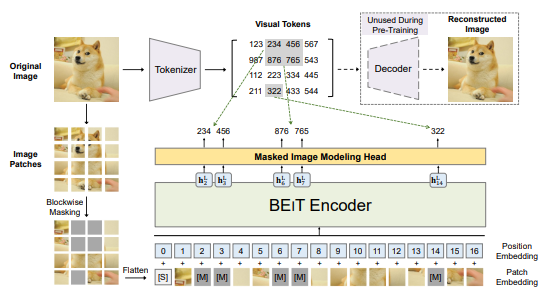
We introduce a self-supervised vision representation model BEiT, which stands for Bidirectional Encoder representation from Image Transformers. Following BERT developed in the natural language processing area, we propose a masked image modeling task to pretrain vision Transformers. Specifically, each image has two views in our pre-training, i.e, image patches (such as 16x16 pixels), and visual tokens (i.e., discrete tokens). We first "tokenize" the original image into visual tokens. Then we randomly mask some image patches and fed them into the backbone Transformer. The pre-training objective is to recover the original visual tokens based on the corrupted image patches. After pre-training BEiT, we directly fine-tune the model parameters on downstream tasks by appending task layers upon the pretrained encoder. Experimental results on image classification and semantic segmentation show that our model achieves competitive results with previous pre-training methods. For example, base-size BEiT achieves 83.2% top-1 accuracy on ImageNet-1K, significantly outperforming from-scratch DeiT training (81.8%) with the same setup. Moreover, large-size BEiT obtains 86.3% only using ImageNet-1K, even outperforming ViT-L with supervised pre-training on ImageNet-22K (85.2%). The code and pretrained models are available at this https URL.
Citation
@inproceedings{beit,
      title={{BEiT}: {BERT} Pre-Training of Image Transformers},
      author={Hangbo Bao and Li Dong and Songhao Piao and Furu Wei},
      booktitle={International Conference on Learning Representations},
      year={2022},
      url={https://openreview.net/forum?id=p-BhZSz59o4}
}
Usage
To use other repositories' pre-trained models, it is necessary to convert keys.
We provide a script beit2mmseg.py in the tools directory to convert the key of models from the official repo to MMSegmentation style.
python tools/model_converters/beit2mmseg.py ${PRETRAIN_PATH} ${STORE_PATH}
E.g.
python tools/model_converters/beit2mmseg.py https://conversationhub.blob.core.windows.net/beit-share-public/beit/beit_base_patch16_224_pt22k_ft22k.pth pretrain/beit_base_patch16_224_pt22k_ft22k.pth
This script convert model from PRETRAIN_PATH and store the converted model in STORE_PATH.
In our default setting, pretrained models could be defined below:
| pretrained models | original models |
|---|---|
| BEiT_base.pth | 'BEiT_base' |
| BEiT_large.pth | 'BEiT_large' |
Verify the single-scale results of the model:
sh tools/dist_test.sh \
configs/beit/upernet_beit-large_fp16_8x1_640x640_160k_ade20k.py \
upernet_beit-large_fp16_8x1_640x640_160k_ade20k-8fc0dd5d.pth $GPUS --eval mIoU
Since relative position embedding requires the input length and width to be equal, the sliding window is adopted for multi-scale inference. So we set min_size=640, that is, the shortest edge is 640. So the multi-scale inference of config is performed separately, instead of '--aug-test'. For multi-scale inference:
sh tools/dist_test.sh \
configs/beit/upernet_beit-large_fp16_640x640_160k_ade20k_ms.py \
upernet_beit-large_fp16_8x1_640x640_160k_ade20k-8fc0dd5d.pth $GPUS --eval mIoU
Results and models
ADE20K
| Method | Backbone | Crop Size | pretrain | pretrain img size | Batch Size | Lr schd | Mem (GB) | Inf time (fps) | mIoU | mIoU(ms+flip) | config | download |
|---|---|---|---|---|---|---|---|---|---|---|---|---|
| UPerNet | BEiT-B | 640x640 | ImageNet-22K | 224x224 | 16 | 160000 | 15.88 | 2.00 | 53.08 | 53.84 | config | model | log |
| UPerNet | BEiT-L | 640x640 | ImageNet-22K | 224x224 | 8 | 320000 | 22.64 | 0.96 | 56.33 | 56.84 | config | model | log |